 Clos
Reconcile in minutes.
Close faster.
Sign off with confidence.
Import your bank statements and ledgers. Closentry matches them for you, so you only resolve the exceptions — then each reconciliation moves through review and approval, with every decision recorded in a signed audit trail. All on your own computer.
- No credit card
- Every feature, up to 5 people
- Installs without admin rights
- Works offline
- 6reconciliation types in one app
- 0 bytesof your data sent anywhere by Closentry
- Signedaudit trail of every decision: who, when, on which computer
- 30 daysfree trial with every feature
Month-end shouldn't mean a week of spreadsheets
VLOOKUPs, colour-coded rows and "final_v7.xlsx" break the moment the bank changes its format. Closentry does the matching, keeps the evidence and shows you exactly what still needs a human.
The spreadsheet way
- Hours of ticking lines by hand, one statement at a time
- Formulas that silently break when a file has one more column
- No record of who changed what, or why a difference was accepted
- Reviewers re-doing the work because they can't trust it
- Bank data emailed around or uploaded to someone else's cloud
The Closentry way
- Load two files - matching runs in seconds, one-to-one and many-to-one
- Map a bank's columns once; Closentry remembers the layout
- Every decision, reason and balance in a signed, tamper-evident audit trail
- Prepared, reviewed by a second person in a team, then locked
- Everything stays on your computers - nothing is uploaded
Made for the people who sign off the numbers
From a two-person finance office to a group closing several companies every month.

Finance teams
Reconcile every bank account, supplier and customer each month, with a reviewer's sign-off and the evidence kept.
Start the free trial
Accounting and audit firms
Reconcile clients' accounts in one place, hand reviewers clean workpapers, and earn 25% recurring as a partner.
See the partner program
Groups of companies
Close several companies together: account reconciliations against each trial balance, and intercompany pairs with netting and eliminations.
Compare plansFrom two files to a signed-off reconciliation
Four steps. The app shows you where you are and what's left at every one of them.
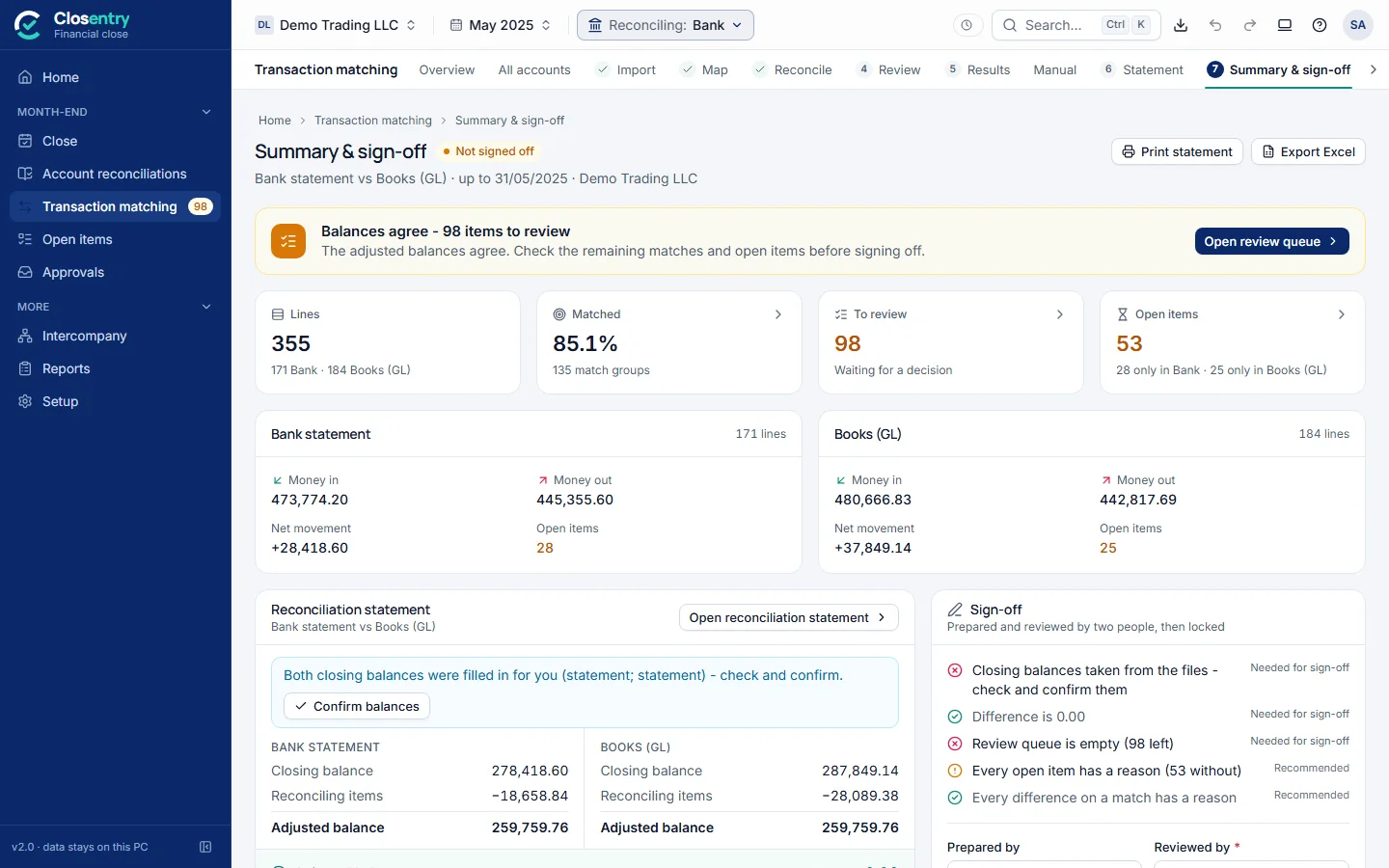
Drop in your bank statement and your books
Excel, CSV, PDF from your bank or accounting system, MT940, CAMT.053, BAI2, OFX or QIF. Even scanned statements are read with the OCR built into Windows.
- Letterheads, totals and balance lines are left out automatically
- Every bank account in one run
- Up to 500,000 lines per file
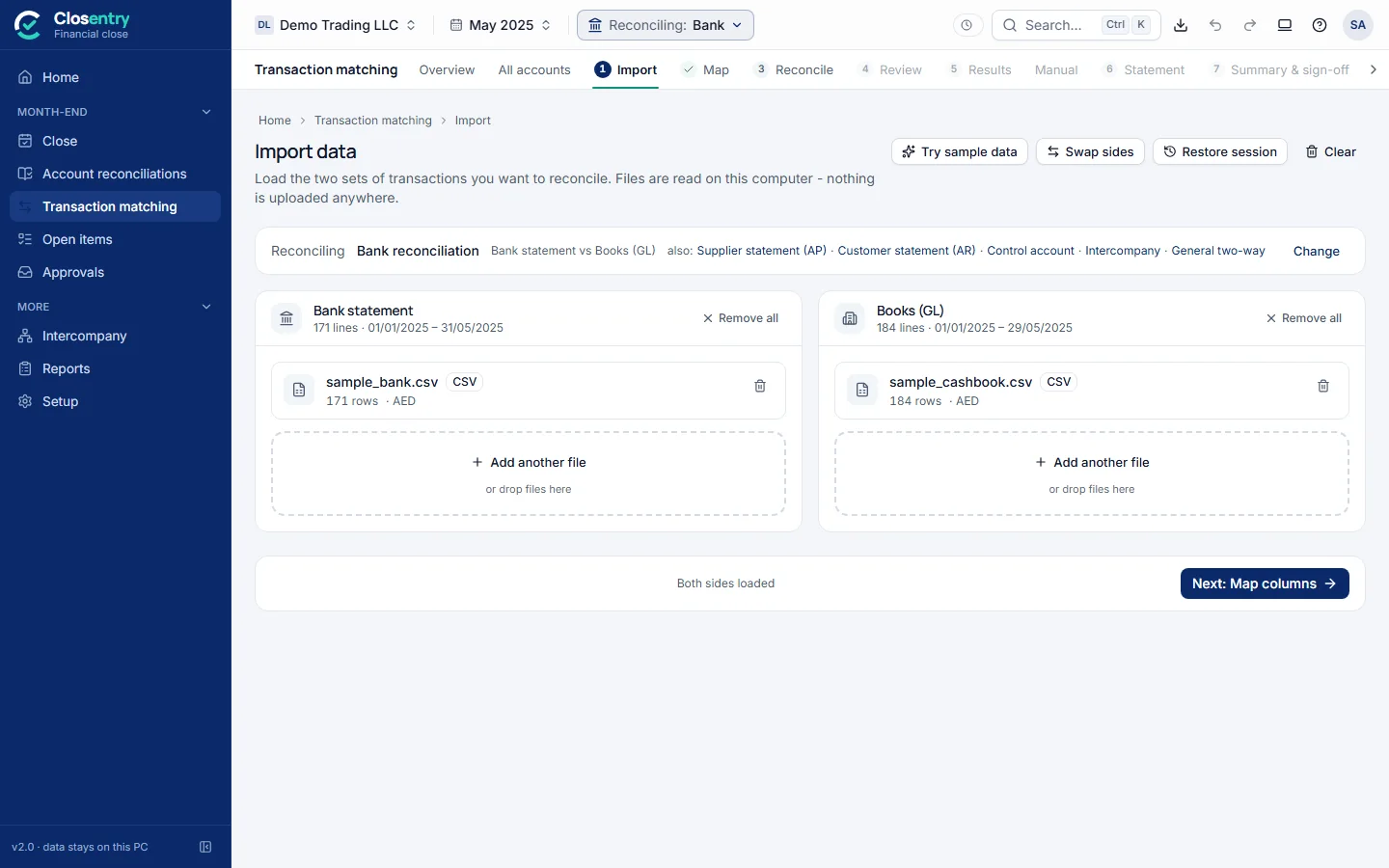
Tell it what the columns mean - once
Pick "bank statement" or "books", choose the card that looks like your file, and the totals check themselves as you go. Next month, the same bank is mapped for you.
- Plain words: "money went out" or "money came in"
- A 30-second video right on the screen
- Formats and filters tucked away until you need them
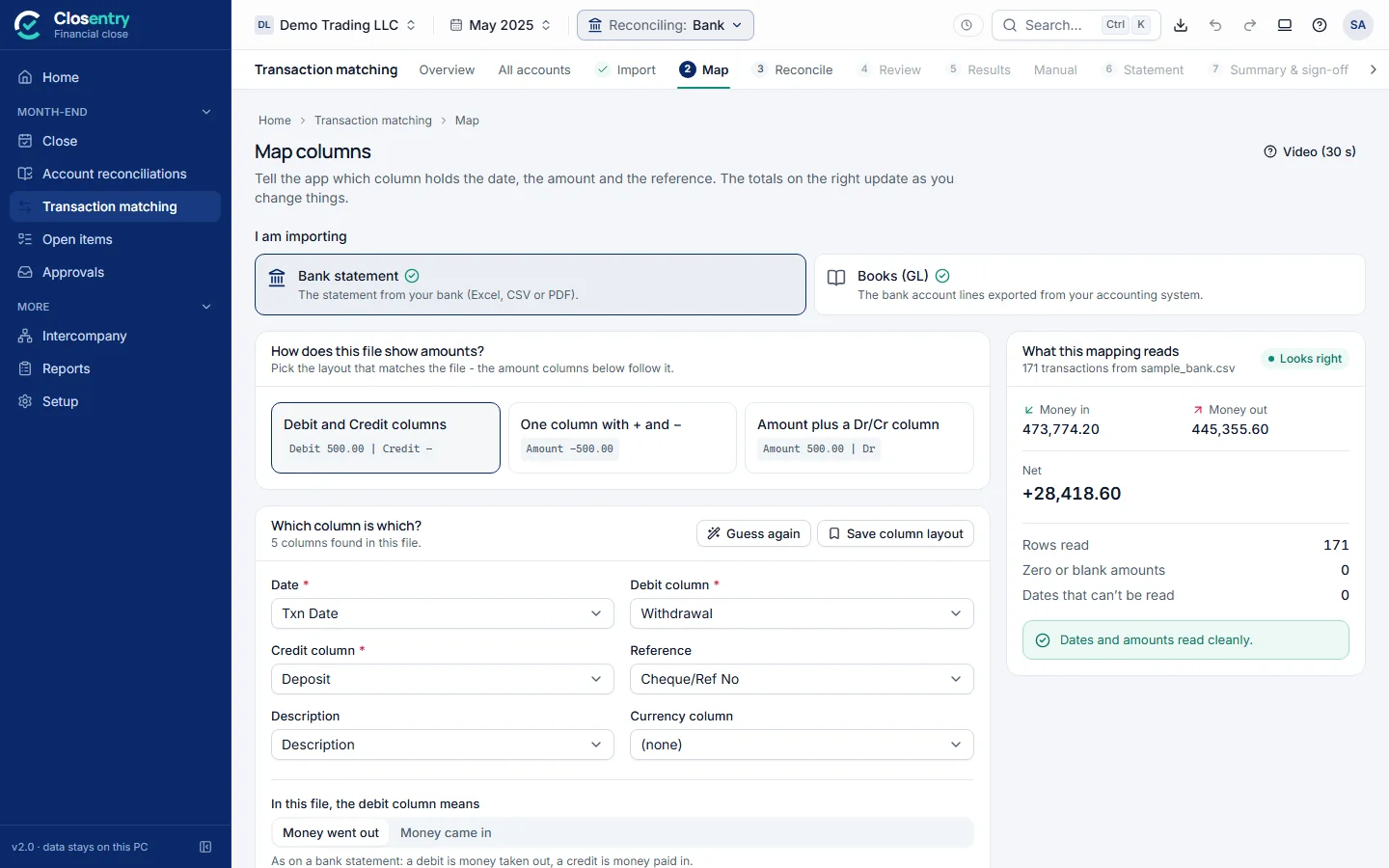
Check only what needs a human
Clear matches are done for you. Everything else waits in the review queue - each item starts with one plain sentence saying why it's there.
- "Matched on amount and date only - the references differ. Please confirm."
- Accept, reject or match by hand with one key
- Every accepted difference asks for a reason
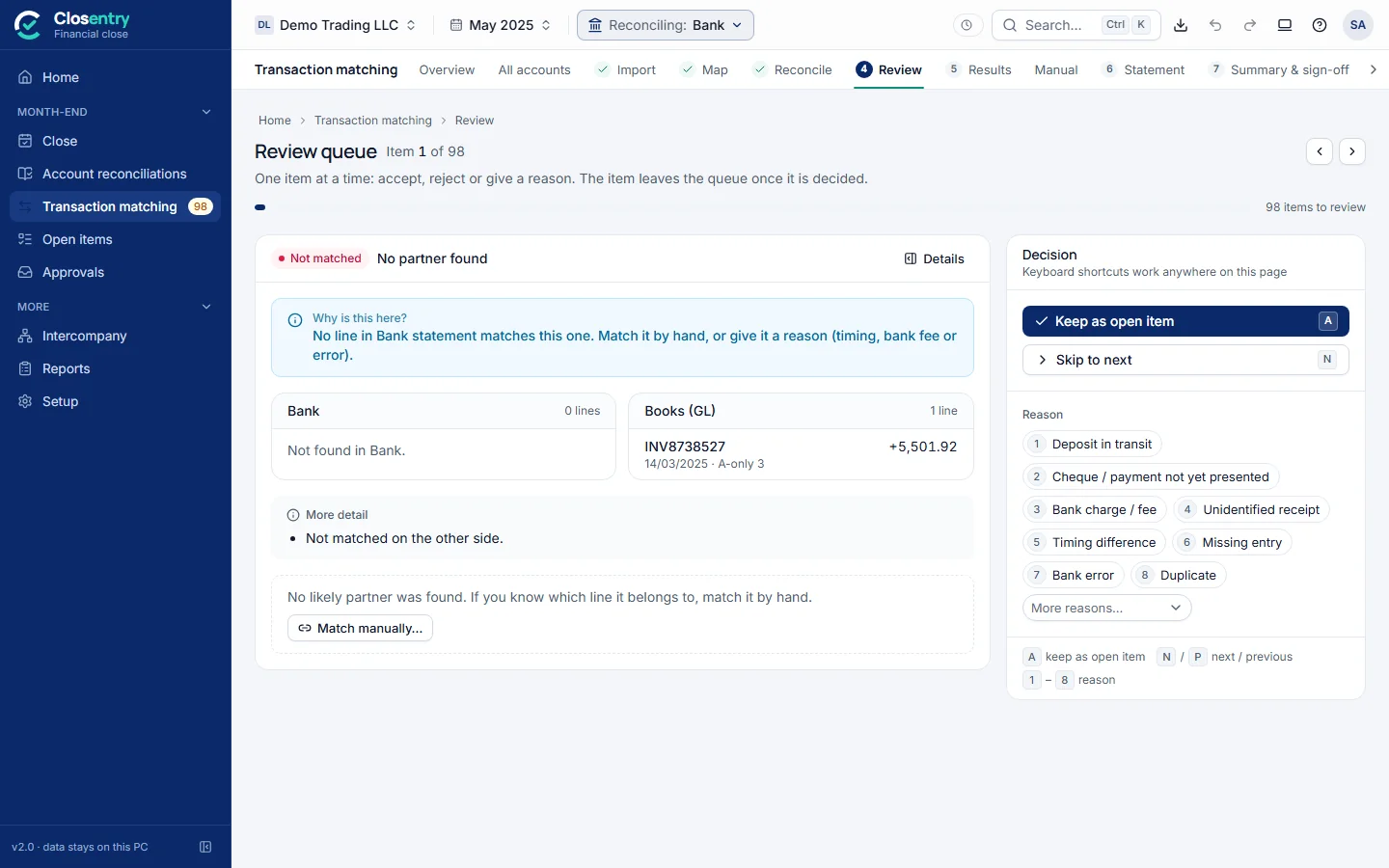
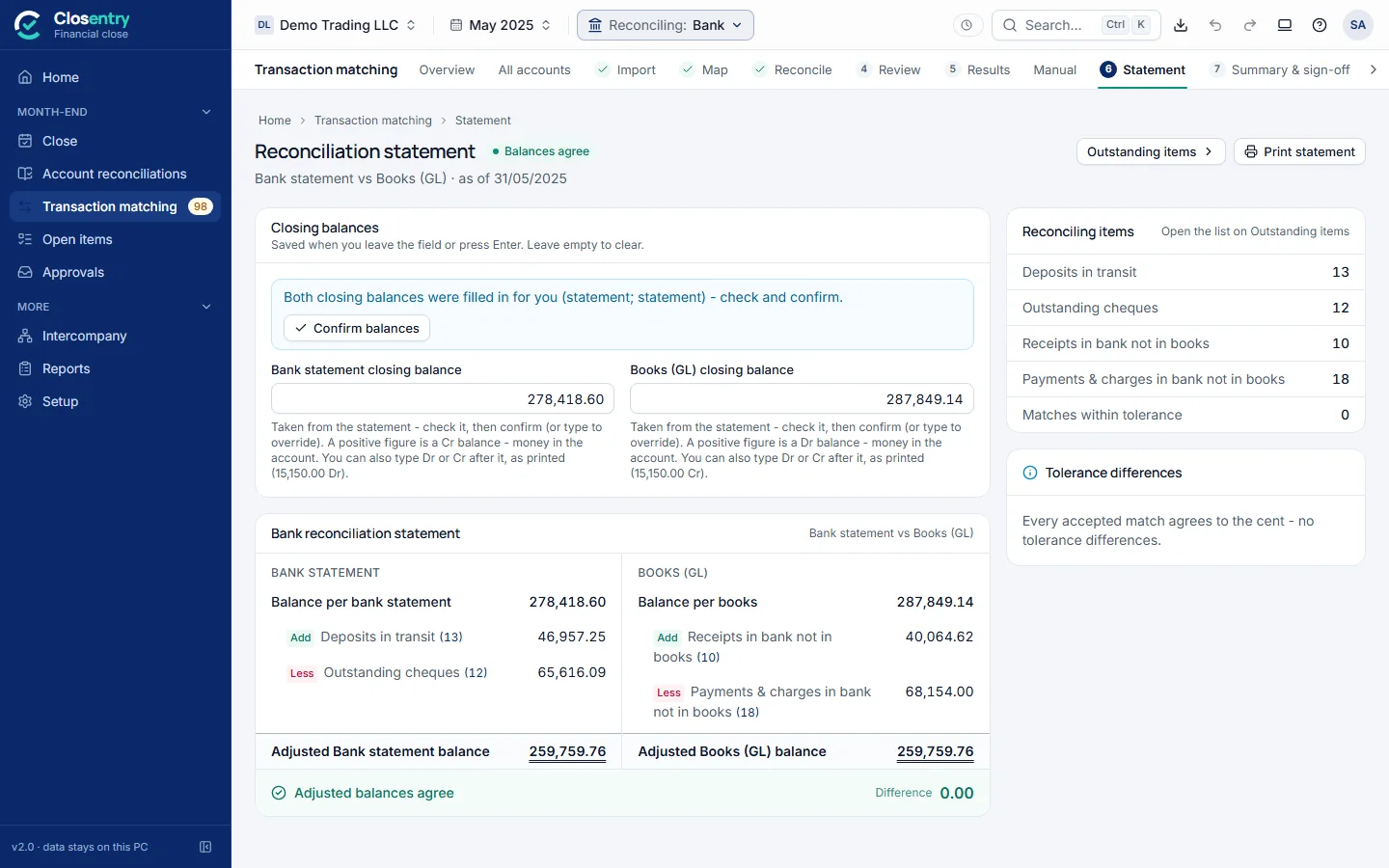
Balances agree. It is reviewed. It locks.
The reconciliation statement shows both adjusted balances side by side. A checklist says what's still needed, then it is signed off - by a reviewer in a team, or marked self-approved when you work alone - and locked.
- Print-ready statement and Excel report
- Open items carried to next month automatically
- The audit trail proves nothing changed afterwards
Built by accountants' rules, not a programmer's
Everything a finance team needs to close the month with evidence - and nothing that gets in the way.
Smart matching
Exact references, similar references, date drift, rounding, foreign currency, one-to-many and many-to-one - each match labelled with how sure it is.
"Why is this here?"
Every item in the review queue opens with one plain sentence. New staff know exactly what to check - no training manual needed.
Reviewed and locked
In a team, prepared by one person and reviewed by another in their own login, then locked. Working alone, self-approval is clearly marked. Unlocking needs a reason.
Tamper-evident audit trail
Every balance, match, reason and approval - signed, with before and after values. Removed or edited entries are detected.
Month-end close
A close checklist with owners and deadlines, balance-sheet account reconciliations against the trial balance, and approvals.
Reports your auditor likes
The reconciliation statement, outstanding items, Excel workpapers and your own custom report layout - all with who prepared and reviewed.
Made for teams
A shared team folder is all it takes. Preparers, reviewers, approvers and free viewers - with seats managed by the admin.
Ready for your region
Currency, date order, weekend and decimals follow your computer's region on first start. Works in any currency, with foreign-currency matching.
Fast to use
Ctrl+K search across everything, keyboard shortcuts in the review queue, light and dark themes.
Not just the bank
Any two lists of transactions. Switch type from the top bar - the matching rules adjust for you.
Bank reconciliation
Bank statement against the cash book, every account in one run.
Supplier statements (AP)
The supplier's statement against your purchase ledger.
Customer statements (AR)
Customer records against your sales ledger.
Control accounts
A general-ledger control account against its subledger.
Intercompany
Every pair in the group, with netting and eliminations.
General two-way
Any two sources - payroll, cards, payment gateways.
Your newest hire can review the queue on day one
Reconciliation software usually shows a score and a code. Closentry tells you what agreed, what didn't, and what to do about it.
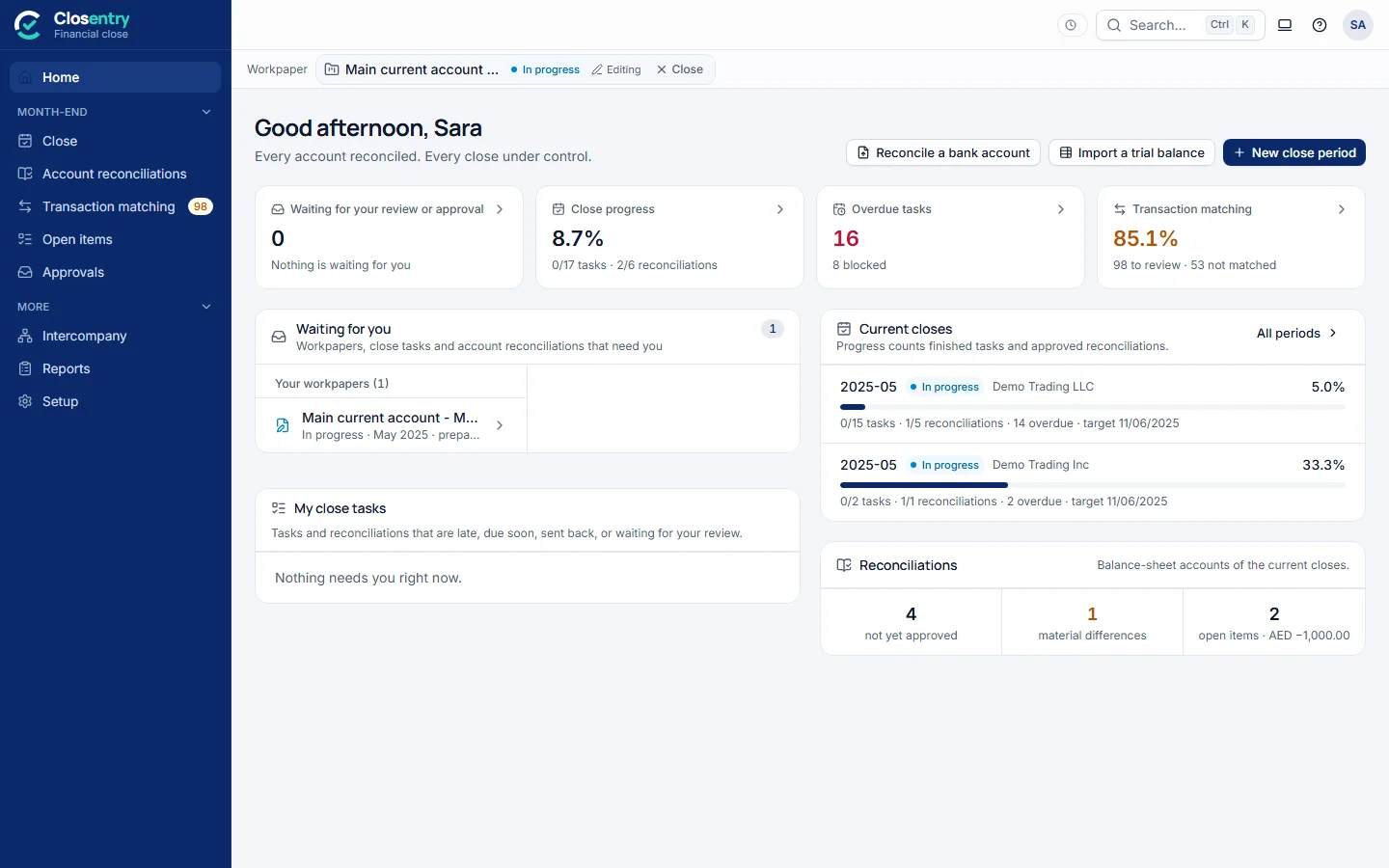
See the whole close at a glance
Who's waiting on whom, what's overdue, which accounts still differ from the trial balance - on one home screen.
- Close periods with tasks, owners, deadlines and reminders
- Balance-sheet reconciliations straight from your trial balance
- Workpapers with sealed evidence and approvals
- Several companies and an intercompany group in one place
Closentry never sends your data anywhere
No cloud upload, no account to create, no internet needed. Closentry runs entirely on your Windows PC, and your data stays there or in the shared folder you choose.
Keys are checked on your computer. Nothing phones home.
Optionally encrypt your session, audit trail and history with your Windows login.
Any edit or removed entry is detected and reported.
No admin rights, no server, no open ports to the network.
Watch a complete bank reconciliation
From two files to a signed-off statement, narrated step by step.
Works with the files you already have
The control of a close platform, on your own PCs
What finance teams usually use for reconciliation today, side by side.
| Spreadsheets | Bank feed in accounting software | Cloud close platforms | Closentry | |
|---|---|---|---|---|
| Many-to-one and foreign-currency matching | By hand | Basic suggestions | ||
| Supplier, customer, control-account and intercompany | Separate files | Mostly bank only | ||
| Reviewer sign-off with a signed audit trail | Usually not | |||
| Month-end close checklist and account reconciliations | ||||
| Where your data is kept | Your PCs | The vendor's cloud | The vendor's cloud | Your PCs |
| Set-up | None | Part of the software | A project, often weeks | Install and start today |
| Typical cost | Your team's time | Included | Quoted, often five figures a year | From USD 399 a year |
A general comparison of each kind of tool, not of any one product.
One annual licence. No surprises.
Every plan includes reconciliation, matching, the audit trail, imports, exports and updates. Viewers are always free.
Prices exclude VAT / sales tax.
Before you try it
Do I need to install anything else?
No. Closentry is one program of about 15 MB for Windows 10 or 11. It needs no Python, no database, no administrator rights and no internet connection.
Is the free trial really the full product?
Yes - every feature for 30 days, for up to 5 people, with no card needed. When you buy, you enter a licence key and keep all your work.
Where is my data stored?
On your computer, or in a shared team folder you choose (a network drive, for example). Nothing is uploaded anywhere - not even to us.
My bank's file looks different. Will it work?
Almost certainly. You map the columns once in plain words and Closentry remembers the layout. PDFs from banks and accounting systems are read too, and scanned statements go through Windows' own OCR.
Can my auditor rely on it?
In a team, sign-off needs a second person in their own login (working alone, self-approval is marked on the sign-off and in reports); every typed balance and accepted difference is recorded with a reason, and the audit trail is signed so changes or removed entries are detected. Reports show who prepared and who reviewed.
Does it handle three-decimal currencies and Arabic?
Yes. Choose three decimals for KWD, BHD or OMR in settings, and switch the interface to Arabic under Settings > Interface. Arabic is a preview: some messages and reports stay in English.
What happens when the licence ends?
You get a reminder 14 days before. Afterwards the app keeps working for 7 days, then opens read-only - you can still open and export everything until you renew.
Close your next month with Closentry
Download the free 30-day trial and reconcile your first bank account today - with the sample data, or your own.
Windows 10 / 11 · No credit card · No admin rights needed